PyTango is unable to create the Database device because it can detect the TANGO_HOST. Did you set the TANGO_HOST environment variable?
I sincerely advice you to read the Tango docs and previous posts in this topic. All the information regarding Panic assumes that the reader has a good level of Tango programming. You’ll need some try and error to develop these skills; so please follow the documentation and practice with Tango so you’ll get the knowledge to follow the most advanced guides.
Most PYALARM options are explained in the presentations/links I pasted before in this same post:
Anyway, most of options don’t need to be modified unless you have a deeper knowledge of Tango. I advice you to use the default values and play just with AlarmThreshold, PollingPeriod and Enable.
Don’t modify the other properties until you’ll have a better knowledge on how devices interact with each others (timeouts and exceptions).
I have set the TAnGO_HOST environement variable and read the documents of PyAlarm device server.
1.) There no where i can found about how to link Panic GUI with Taurus
2.) I have to use Panic GUI over network.
I connected 2 PCS.
In PC-1, I am running the PyAlarm Device and Panic GUI
In PC-2, I set the tango host as the “IP oF PC-1:10000”.
Now i am running the gui.py file and it is producing the following error
[b]INFO 2015-08-04 11:44:09,226 TaurusRootLogger: Using “PyQt4” for Qt
MainThread INFO 2015-08-04 11:44:09,226 TaurusRootLogger: Using “PyQt4” for Qt
PyTangoArchiving.snap not available
loading devattrchange … main …
2015-08-04 11:44:11: In AlarmGUI(): {}
showing splash … PyQt4.QtCore.QSize()
In AlarmAPI(*)
Tue Aug 4 11:44:11 2015: Loading PyAlarm devices matching *
Traceback (most recent call last):
File “gui.py”, line 1001, in
n = main(sys.argv[1:] or ([os.getenv(‘PANIC_DEFAULT’)] if os.getenv(‘PANIC_DEFAULT’) else )).exec_()
File “gui.py”, line 933, in main
alarmApp = AlarmGUI(filters=‘|’.join(a for a in sys.argv[1:] if not a.startswith(‘–’)),options=opts,mainwindow=tmw)
File “gui.py”, line 69, in init
self.api = panic.AlarmAPI()
File “/opt/TangoSoftwares/Panic_Alarm_Suite/fandango/objects.py”, line 346, in new
cls.init_single(__instance,p,**k) #If no init or init_single has been defined it may trigger an object.init warning!
File “/opt/TangoSoftwares/Panic_Alarm_Suite/panic/panic.py”, line 558, in init
self.load(self.filters)
File “/opt/TangoSoftwares/Panic_Alarm_Suite/panic/panic.py”, line 583, in load
all_devices = map(str.lower,fandango.tango.get_database_device().DbGetDeviceList(['',‘PyAlarm’]))
File “/usr/lib64/python2.7/site-packages/PyTango/device_proxy.py”, line 211, in __DeviceProxy__getattr
raise AttributeError(name)
AttributeError: DbGetDeviceList
[/b]
If I install it in single pc ,its running perfectly fine but I have to use over network
So How to use the Panic gui over network ?
as Sergi says the problem seems to be due to panic gui not being able to connect to the database server from the pc where you are running it from. The stack dump basically says this:
all_devices = map(str.lower,fandango.tango.get_database_device().DbGetDeviceList(['*','PyAlarm']))
File "/usr/lib64/python2.7/site-packages/PyTango/device_proxy.py", line 211, in __DeviceProxy__getattr
raise AttributeError(name)
AttributeError: DbGetDeviceList
You should try to connect to the database from a python shell e.g. ipython or itango. Alternatively you can debug the application at this point.
Do you have any TANGO expert in your team who can help you? This is a fairly basic problem and not really specific to Panic.
Now I am able to run Panic gui from other PC also. It was my mistake. I didnot set the path of PyTango in python path, thats why the above error was coming.
I have made one gui in taurus and there is one button in which I have to display the overall status of alarm.
If alarm comes it should be red and on recovery it should be green so the operator who uses taurus gui comes to know about the alarm status.
So how to achieve this ? Also what does “Use Taurus” specify ? It should be put “false” or “true” or “anything else” ?
How to add boolean attribute of alarm to taurus widget ?
My team is new to Tango so we are finding it bit difficult. You guys are the only people whom we can reach for help. And trust me you guys are doing amazing job, even after having so much work pressure , you take out time and reply to our/others queries.
To display all alarms in a given control system I can use this code:
import taurus,PyQt4,panic
from taurus.qt.qtgui.panel import TaurusForm
qapp = PyQt4.Qt.QApplication([])

#Obtain all alarm attributes (get_attribute() returns just attr name, with full=True returns device/attr)
alarms = panic.api()
my_alarm_attribute = alarms['MY_ALARM'].get_attribute(full=True)
all_alarm_attributes = [a.get_attribute(full=True) for a in alarms.values()]

#Then create a taurusform and display the attributes
tf = TaurusForm()
tf.setWithButtons(False)
tf.addModels(all_alarm_attributes)

tf.show()
qapp.exec_()
The UseTaurus property is related to how each PyAlarm device connects to Tango, whether using the taurus.core classes or PyTango proxies instead.
It is an internal feature of the device server and it is still under test, so I advice you to keep it always equal to False. When the usage of taurus.core will be fully tested it will become True by default (if taurus is available).
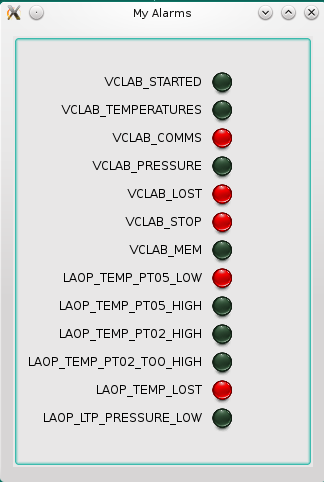
Well, the previous example will display leds in GREEN for active and “dull” green for inactive.
To display leds in RED you must execute a TaurusLed color replacement in all the models you added to the form
import taurus,PyQt4,panic
from taurus.qt.qtgui.panel import TaurusForm
qapp = PyQt4.Qt.QApplication([])

#Obtain all alarm attributes (get_attribute() returns just attr name, with full=True returns device/attr)
alarms = panic.api()
all_alarm_attributes = [a.get_attribute(full=True) for a in sorted(alarms.values())]

#Then create a taurusform and display the attributes
tf = TaurusForm()
tf.setWindowTitle('My Alarms')
tf.setWithButtons(False)
tf.addModels(all_alarm_attributes)

from taurus.qt.qtgui.display import TaurusBoolLed
for attr in sorted(all_alarm_attributes):
  #Get the widget in the form linked to this alarm attribute
  widget = tf.getItemByModel(attr)
  #Replacing the default Led in forms by a TaurusBoolLed
  widget.setReadWidgetClass(TaurusBoolLed)
  #Assigning RED as ON/True color
  widget.readWidget().setLedColor('RED')

tf.show()
qapp.exec_()
(if any taurus guru feels chest pain after reading that, please reply with a better recipe).
The code I pasted should display something like the attached screenshot.
Well … I tried that method with an Alarm attribute and I got “RED” for few seconds; until the value is updated and then the color went back to light-green. Maybe is a bug in my current sources, but the bug disappears if I use TaurusBoolLed instead of the default led class.
New releases of PyAlarm 5.3 and PANIC 5.4 have been uploaded to sourceforge. They contain all the bugfixes that were previously available only in the .tgz attached to this post.
As highlights: many bugs have been solved in the Acknowledge/Disable/Delete/Preview actions of the GUI, in addition the new API.evaluate() method allows the GUI to test new formulas on the PyAlarm device before saving.
They are meant to work together, so you must update both and also Fandango.
Hi, I am trying to use the panic API for a Tango server but keep running into issues.
I have a tango server with the address - ‘C3/aouda/1’ and I want to add an alarm for this. I then added a PyAlarm device called ‘test/alarms/1’ in the following manner
from fandango.tango import add_new_device,put_device_property
add_new_device('PyAlarm/1','PyAlarm','test/alarms/1')
After this I used panic to connect these and add an alarm:
Now when I try to check the severity of the ‘TEST_ALARM’ I am always getting it as warning(even when the attribute values are not crossing 40). When I try to check if alarm is active or not I am getting the following results:
In [53]: import panic

In [54]: alarms = panic.api()

In [55]: test_alarm = alarms['TEST_ALARM']

In [56]: test_alarm.active
Out[56]: 0

In [57]: alarms.get_states()
Out[57]: {'TEST_ALARM': False}
For some reason it seems like the alarm is not functioning. Both the device servers are running (Both ‘test/alarms/1’ and ‘C3/aouda/1’). Please help.
My device name is : l/m/n
Attributes are : Speed1, Speed2, Speed3 …,Speed99
While defining rule, I am defining as
l/m/n/Speed1.quality==ATTR_ALARM or l/m/n/Speed2.quality == ATTR_ALARM or l/m/n/Speed3.quality=ATTR_ALARM
I have to define the above rule for 99 parameters.
I have to manually write these values to define rule.
1.)Is there any way to write the rule by reading attribute name and device name from custom database ? It means that in defining above rule, I don’t have to manually write rule for all parameters. It will read the device and attribute name from database and write the rule accordingly.
2.)The rule must also be configurable, Suppose if Speed1 becomes Speed111, then rule will also be l/m/n/Speed111.quality==ATTR
_ALARM